



Want your TikTok videos to go viral? It’s not just about luck. While great ideas are key, it’s your video editing that transforms a good clip into an algorithm-loving, audience-engaging masterpiece. The right edits can boost your watch time, skyrocket your retention rate, and finally land you on the coveted For You Page (FYP).
This guide breaks down the exact TikTok video editing tips and techniques used by top creators. We’ll move beyond basic cuts to the strategic edits that signal quality to the TikTok algorithm and keep viewers hooked from the first second to the last. For a broader look at what makes content shareable, check out our ultimate guide on how to make a viral video.
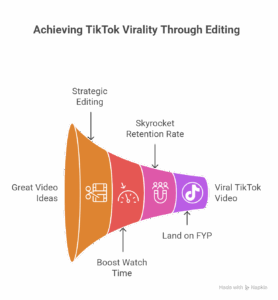
Table of Contents
Why Editing is the Secret to the TikTok Algorithm
The Golden Rule: Mastering the 3-Second Hook
Essential TikTok Editing Techniques to Learn
Pace & Rhythm: The Power of Quick Cuts
Creating Seamless Transitions
Using Text & Captions Effectively
Leveraging Green Screen and Effects
How to Ride a Trend with Your Edits
Optimization: Final Settings Before You Post
Best Video Editing Apps for TikTok
FAQ: Your TikTok Virality Questions Answered
1. Why Editing is the Secret to the TikTok Algorithm
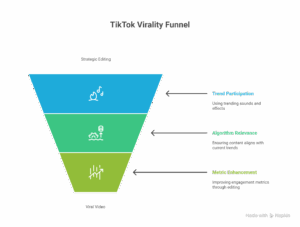
Many creators think the algorithm is a mystery. But it’s simple: TikTok’s primary goal is to keep users on the app. It promotes videos that achieve high audience retention and engagement.
How does video editing influence this?
Fast Pace: Maintains viewer interest, reducing drop-off.
High Value: Professional-looking edits make content feel more valuable, encouraging likes and shares.
Clarity: Good use of text and captions makes your video understandable even on mute, increasing its appeal.
Trend Participation: Using trending sounds and effects correctly tells the algorithm your content is relevant right now.
Simply put, strategic editing directly influences the metrics that make your video go viral on TikTok. This principle is core to our philosophy of effective video production.
2. The Golden Rule: The 3-Second Hook
You have less than three seconds to convince a viewer to keep watching. This initial hook is the most critical video editing tip for maximum virality.
How to edit a powerful hook:
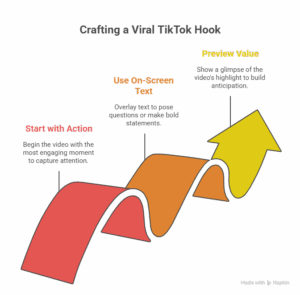
Start with the Action: Never have a slow intro. Begin in the middle of the action—the result, the surprise, or the most dramatic moment.
Use On-Screen Text: Pose a compelling question or a bold statement immediately.
Preview the Value: Show a quick, flash-forward glimpse of the most exciting part of your video to create curiosity.
3. Essential TikTok Editing Techniques to Learn
Pace & Rhythm: The Power of Quick Cuts
Long, static shots are the enemy of TikTok virality. The platform thrives on high energy.
How to do it: Film multiple short clips of the same action. In your editor, trim each clip to between 0.5 and 1.5 seconds and place them back-to-back. This creates a dynamic, fast-paced rhythm that is addictive to watch.
Pro Tip: Sync your cuts to the beat of your chosen Trending Audio for a satisfying feel.
Creating Seamless Transitions
Seamless transitions make your videos look professional and keep the flow uninterrupted.
The Whip Pan: The most popular transition. Film yourself quickly panning the camera away from a subject (creating a motion blur), then do the same motion in your next clip. Edit them together at the peak of the blur.
The Object Match: Match the position of an object or your body between two different scenes for a smooth, magical transition.

Using Text & Captions Effectively
Over 80% of viewers watch with the sound off initially. Subtitles and captions are non-negotiable.
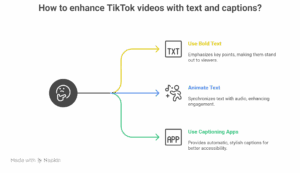
Use Bold Text: Place clear, bold text on screen to emphasize key points.
Animate Your Text: Make text appear in sync with your voice or the music to highlight important moments.
Tools: Use apps like CapCut or Vita that offer automatic, stylish captioning.
Leveraging Green Screen and Effects
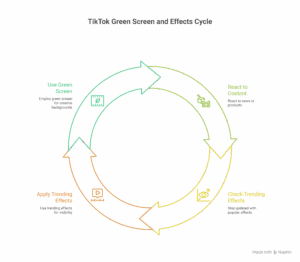
TikTok’s built-in Green Screen effect and trending effects are powerful tools for storytelling and creativity.
How to use it: Use the green screen to react to a news article, show a location behind you, or display a product image while you talk about it. This is a fantastic technique for creating engaging promotional videos directly on your phone.
Stay Trendy: Always check the “Trending” tab in the effects menu. Using a new, popular effect can give your video a significant visibility boost.
4. How to Ride a Trend with Your Edits
Virality often comes from participating in trends correctly.
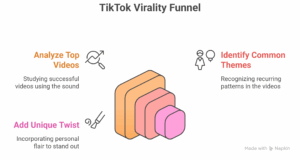
Find a Trending Sound: Go to the TikTok Discover page and find a sound that is gaining traction.
See the Top Videos: Analyze the top videos using that sound. What editing style do they use? What’s the common theme?
Add Your Twist: Don’t just copy. Use the same sound and core concept, but apply your unique knowledge, humor, or editing flair to stand out.
5. Optimization: Final Settings Before You Post
Your editing work isn’t done until you’ve optimized these final details:
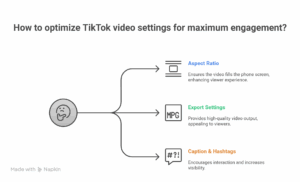
Aspect Ratio: Always 9:16 vertical (1080×1920 px) to fill the entire phone screen.
Export Settings: Export in at least 1080p resolution and 30fps for the best quality.
Caption & Hashtags: Write a compelling caption with a clear CTA (e.g., “Comment your guess below!”). Use 3-5 relevant hashtags, including a mix of broad (#VideoEditingTips) and niche (#BookTokEdits).
6. Best Video Editing Apps for TikTok
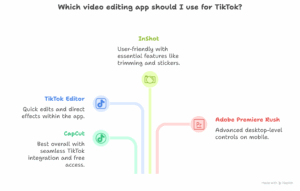
CapCut (Best Overall): Free, from TikTok’s parent company. Perfect integration with TikTok sounds, trending templates, and easy exporting.
TikTok’s Built-In Editor: Great for quick cuts, adding text, and using effects directly.
InShot (User-Friendly): Simple interface with all the essential features like trimming, speed adjustment, and stickers.
Adobe Premiere Rush (Pro on the Go): For creators who want more advanced desktop-level controls on their mobile device.
For more complex projects that go beyond mobile editing, our team at SynapseTalent specializes in professional explainer video production services that captivate audiences.
FAQ: Your TikTok Virality Questions Answered
What is the best aspect ratio for TikTok videos?
The ideal aspect ratio for TikTok is a vertical 9:16 at a resolution of 1080×1920 pixels. This ensures it fills the entire mobile screen, providing an immersive experience for the viewer.
How long should a TikTok video be to go viral?
While TikTok allows videos up to 10 minutes, the most viral videos are typically between 21-34 seconds. This length is perfect for maintaining a high average watch time, which is a key metric the TikTok algorithm favors. The key is to keep it as short as possible while delivering value.
Is CapCut good for editing TikTok videos?
Yes, CapCut is an excellent editor for TikTok. It’s free, made by ByteDance (TikTok’s parent company), and offers features like trending templates, seamless integration with TikTok sounds, and easy one-click exporting directly to the platform. It’s the best tool for implementing these video editing tips.
Why are my TikTok videos not getting views?
If your TikTok videos aren’t getting views, common editing-related reasons include: a weak hook in the first 3 seconds, a slow pace that causes viewers to swipe away, poor lighting or audio quality, and not participating in trends. Focus on improving your audience retention through faster edits and higher value. For more advanced tips, explore our blog on video production techniques.
Conclusion
Mastering these TikTok video editing tips is your fastest path to maximum virality. Remember, it’s not about using every single effect, but about strategically employing edits—like a strong hook, quick cuts, and seamless transitions—to serve the algorithm by boosting watch time and audience retention.
Consistency is key. The more you apply these techniques, the more intuitive they will become, and the closer you’ll get to that coveted spot on the For You Page.
What’s the one editing trick you’re going to try first? Let me know in the comments!