

Introduction
If you’ve ever stopped scrolling because a post moved—a headline sliding in, icons popping, numbers animating—that’s motion design doing its job. In simple terms, motion graphics examples are visuals that combine text, shapes, icons, and design elements with animation to communicate faster than static images. They’re not cartoons. They’re purpose-built visuals that make information clearer, more watchable, and more shareable.
On platforms like Instagram, TikTok, LinkedIn, and YouTube, motion wins because it earns attention during fast scrolling and keeps viewers watching even on silent autoplay. That longer watch time often translates into better reach, higher clicks, and more engagement.
At Synapse Talent, we design motion graphics for brands, startups, and digital campaigns that need higher engagement and clarity. The right motion style doesn’t just look “cool”—it drives results.
What Are Motion Graphics?
Motion graphics are essentially graphics with movement. Instead of relying on photos or live footage, motion design uses animated text, icons, shapes, illustrations, and layouts to tell a story or explain a point.
You’ll see motion graphics used in many places:
- Social media posts, reels, stories, and ads
- Paid advertising creatives and product promos
- Explainer motion graphics for services, apps, or processes
- UI/UX motion graphics like micro-interactions and app transitions
- Broadcast motion graphics such as lower thirds, tickers, and titles
Google tends to recognize motion formats as distinct “entities,” especially these:
- Kinetic typography examples (moving text animations)
- Animated logo design (logo intros/outros)
- Infographic animation examples (animated stats/data)
- UI/UX animations (buttons, transitions, micro-interactions)
If you’re building social content today, understanding these categories helps you choose motion that aligns with your platform goals.
Why Motion Graphics Drive Higher Engagement on Social Media
Motion works because it fights the biggest enemy on social: the scroll. A static design has one chance to land. Motion gives you multiple moments—an entrance, a reveal, a hook—to win attention.
Here’s what motion typically improves:
- Watch time (people stay longer when something is unfolding)
- Shares (motion makes ideas easier to repeat and pass on)
- Click-through rate (CTR) (movement can guide focus toward a CTA)
- Retention (looping and pacing keep viewers in the post longer)
Motion also fits social behavior. Most platforms autoplay with sound off. Good motion graphics for social media use visual hierarchy—bold text, clean transitions, readable pacing—so the message lands even without audio.
Expert Insight:
High-performing motion graphics marketing isn’t about “more animation.” It’s about timing. Strong motion designers use pacing, contrast, and hierarchy to control what the viewer notices first, second, and third. That’s why pro motion content feels effortless—and random motion content feels noisy.
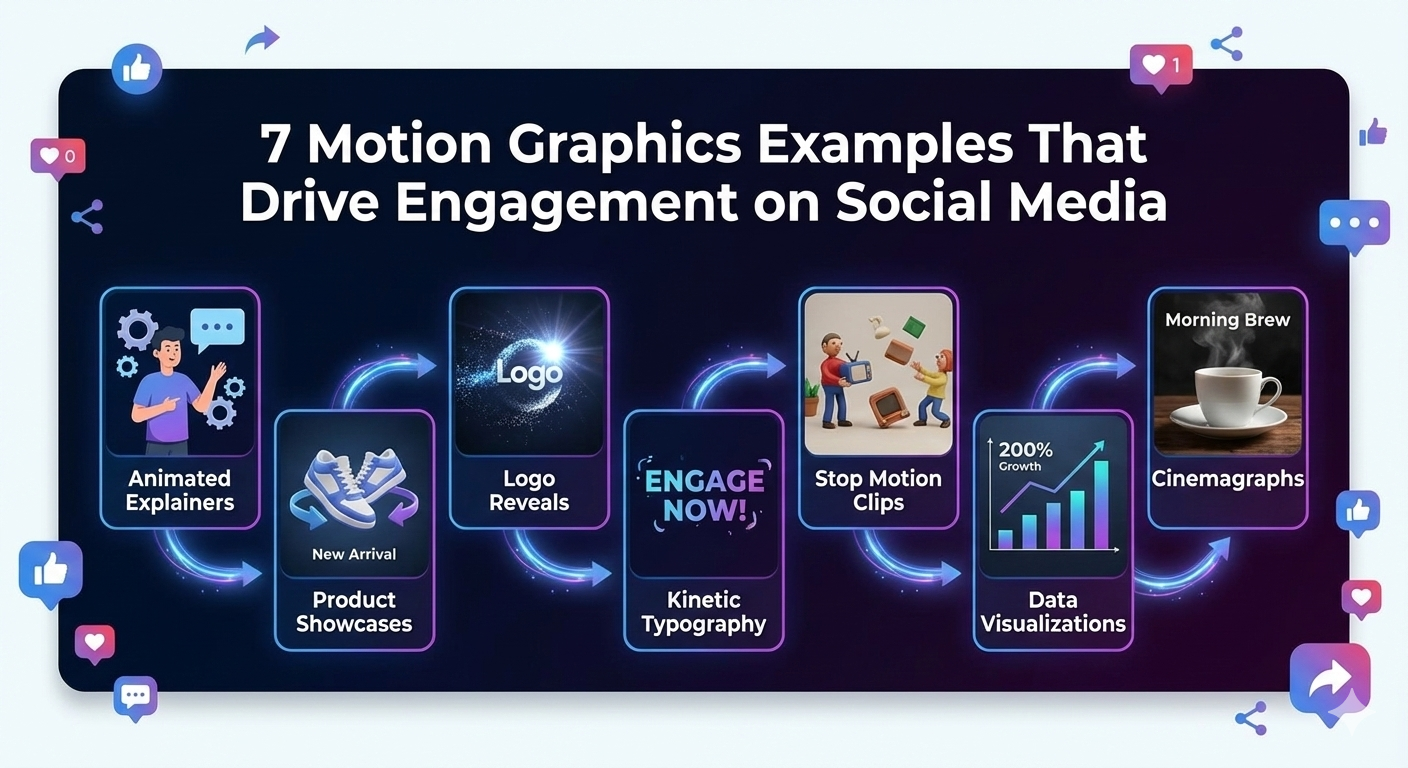
7 Motion Graphics Examples That Drive Engagement
Below are the most practical and proven formats. These aren’t abstract ideas—these are examples brands repeatedly use because they perform.
1. Kinetic Typography (Moving Text Animations)
Kinetic typography is text that moves with rhythm—sliding, scaling, bouncing, or revealing in sync with music, voice, or beats. It’s one of the simplest social media motion graphics formats that consistently performs because the viewer knows exactly what to do: read and follow along. On fast-scrolling platforms, kinetic text helps brands communicate messages clearly without relying on visuals or live footage.
What makes kinetic typography effective in social media motion graphics:
- Delivers the message clearly without relying on visuals or footage
- Works perfectly for short hooks and punchy statements
- Can be adapted quickly for multiple versions and A/B tests
- Performs well on silent autoplay feeds
Use cases:
- Offers and announcements
- “3 tips” and micro-education reels
- Event promos, launches, and limited-time campaigns
Best for: Ads & short-form content
Platforms: Instagram, TikTok, YouTube Shorts
If you’re collecting kinetic typography examples for social media motion graphics, focus on designs with clean pacing—text should remain readable, impactful, and easy to follow without rushing.
2. Animated Logo Animations (Brand Intros & Outros)
An animated logo design is exactly what it sounds like—your logo comes to life in 2–5 seconds as an intro or outro. It’s a small asset that does a big job: builds familiarity.
Why this works:
- Repetition builds brand recall
- Motion adds polish and professionalism
- Helps unify your content across multiple platforms
Where brands use logo animations:
- YouTube intros/outros
- Reels “signature ending”
- LinkedIn thought-leadership series
- Short brand ads (especially retargeting)
Best for: Branding & recall
Platforms: Instagram, YouTube, LinkedIn
Tip: Keep it short. If the logo animation feels longer than the message, people skip.
3. Explainer Motion Graphics Videos
Explainer motion graphics turn a product, service, or process into a short visual story, making them a core part of modern explainer video production. This format works exceptionally well for SaaS, fintech, startups, and service businesses because it replaces confusion with clarity while keeping viewers engaged.
What explainer motion graphics do well:
- Break down complex offerings into simple visuals
- Show “how it works” without needing filming or live footage
- Build trust by structuring information logically and visually
In professional explainer video production, a strong structure usually includes:
- A relatable problem the audience recognizes
- A clear and simple solution
- How it works (shown in easy, visual steps)
- A clear call-to-action that guides the next step
Best for: Education & conversions
Platforms: LinkedIn, Instagram
If your audience needs a bit of context before they buy, high-quality explainer video production using motion graphics is often the fastest and most effective path to conversion.
4. Infographic Animation Examples
Static infographics often look good but don’t get read. Animated infographics fix that by revealing information step-by-step: a number counts up, a chart grows, icons appear in sequence. This format is perfect for brands building authority.
Why animated infographics perform:
- They make data feel “digestible”
- They keep viewers watching to see the next reveal
- They position the brand as credible and informed
Best topics for infographic animation:
- Industry stats
- Case study highlights
- “Before vs after” outcomes
- Market comparisons
Best for: Thought leadership
Platforms: LinkedIn, Twitter (X)
When using infographic animation examples, prioritize clarity. A single strong stat beats five rushed ones.
5. UI/UX Motion Graphics for Apps & Websites
UI UX motion graphics include micro-interactions: button feedback, smooth transitions, loading animations, and app walkthroughs. This content performs well because it feels real—people can see how a product behaves.
Where UI/UX motion is used:
- App launch promos
- Product demo clips
- Landing pages (showing interaction)
- Feature announcements
Why it drives engagement:
- Motion communicates usability
- It reduces friction by showing what to expect
- It supports product storytelling without long explanations
Best for: Product demos
Platforms: Website clips, LinkedIn
If you’re marketing an app or software, UI/UX motion is one of the most convincing “proof” formats.
6. Broadcast Motion Graphics & Social News Visuals
Broadcast motion graphics come from TV-style visuals: lower thirds, tickers, animated titles, segment transitions. On social, this style works because it feels authoritative and structured.
What broadcast-style motion is great for:
- Interviews and podcast clips
- Announcement posts
- News-style updates
- Founder/CEO messaging content
It’s especially effective for professional brands that want a polished tone without over-designing everything.
Best for: Professional brands
Platforms: YouTube, LinkedIn
Used well, broadcast motion design makes your content feel like a “series,” not random posts.
7. Animated Graphic Loops
Animated graphic loops are seamless repeating animations—often 5–10 seconds—that keep people watching longer than they realize. Retention improves because the loop resets smoothly and creates a satisfying “did it restart?” effect.
Where loops perform best:
- Background visuals for ads
- Reels and TikTok with text overlays
- Story stickers and branded elements
- Product mood visuals
Why loops boost engagement:
- Longer view duration signals quality
- Works well with silent autoplay
- Easy to repurpose into multiple creatives
Best for: Retention & engagement
Platforms: Instagram, TikTok
Loops are underrated. If your goal is watch time, they’re one of the simplest wins.
How to Choose the Right Motion Graphics Style for Social Media
Start with the goal. Not the style.
If you need fast engagement, kinetic text or loops work well. If you want conversions, explainers and UI demos usually perform better. The format should match the outcome you want.
Practical checklist:
- Choose the right layout: square, vertical, or horizontal
- Keep animations short and readable
- Maintain brand consistency (fonts, colors, tone)
- Design for silent autoplay (text clarity matters)
- Make the hook obvious in the first 1–2 seconds
Good social media motion design isn’t random animation. It’s controlled attention.
Common Mistakes Brands Make with Motion Graphics
Motion graphics can underperform when brands treat them like decoration. The most common issues:
- Overloading text (too much to read)
- Poor pacing (either rushed or slow)
- Ignoring platform specs (wrong aspect ratio, unsafe margins)
- Inconsistent branding (different fonts and styles every post)
- No CTA (viewer doesn’t know what to do next)
Expert Tip:
Professional motion designers prevent these mistakes by planning storyboards, testing pacing, and designing to platform specs first—before animating a single frame.
Why Professional Motion Graphics Expertise Matters
High-performing motion design is equal parts creativity and control. Real experience matters because timing, hierarchy, and storytelling are learned through practice—not templates.
Professional teams bring:
- Industry and platform understanding
- Strong storytelling and rhythm
- Strategic—not just decorative—animation
- Consistent production quality across campaigns
At Synapse Talent, we deliver motion graphics for marketing and social campaigns with an engagement-first approach—designed to communicate clearly, look premium, and perform across platforms.
Final Thoughts
Motion graphics are no longer optional on social media. They’re one of the most reliable ways to earn attention, communicate quickly, and increase engagement—especially when content is competing in fast-scrolling feeds.
The right motion graphics examples show a simple truth: motion doesn’t just make content prettier. It makes content easier to understand, easier to watch, and easier to remember. To explore different types of motion graphics and see which styles work best for your brand, check out our detailed guide on motion graphics types.
Want high-engagement motion graphics for your brand? Contact Synapse Talent today.
❓ FAQs – Motion Graphics Examples
Q1: What are motion graphics examples?
Motion graphics examples include kinetic typography, logo animations, explainer videos, infographic animations, UI/UX motion, and broadcast graphics.
Q2: Which motion graphics work best on social media?
Short-form motion graphics like text animations, looping visuals, and explainer-style clips usually perform best.
Q3: Are motion graphics better than static images?
Yes. Motion graphics capture attention faster and often generate higher engagement than static visuals.
Q4: How long should motion graphics be for social media?
Ideally 5–30 seconds depending on the platform and goal.
Q5: Can small businesses use motion graphics?
Absolutely. Motion graphics are scalable, cost-effective, and highly effective for digital marketing.